
Garden Planner by Fryd
Fryd GmbHHouse & Home
3.910.00 Reviews
- Version
- 4.5.5
- Installs
- 100.00K
- Age Rating
- Everyone
Screenshots



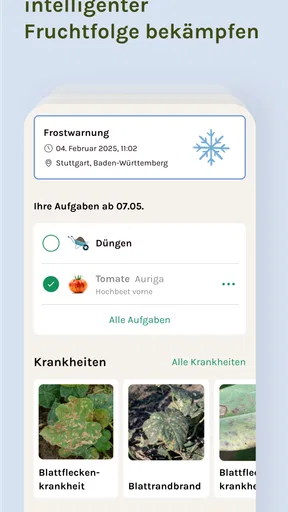
Our Review of Garden Planner by Fryd
 Analysis by Appyee
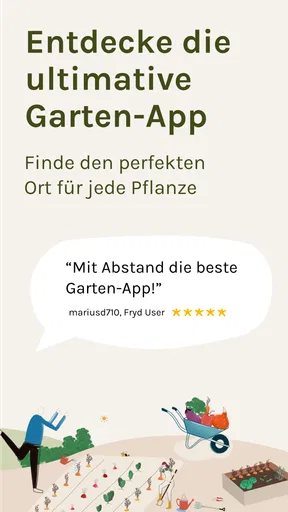
Have you ever dreamed of crafting your own perfect garden but felt a little overwhelmed by the planning process? Well, all you green-thumbed enthusiasts out there, I've got something that might just turn those dreams into reality. I recently got my hands on the Garden Planner by Fryd, and let me tell you, it's like having a personal garden designer right in your pocket.
What makes this sort of planning useful is not just drawing a neat arrangement. It gives me a place to think through the choices that are easy to forget once I am standing outside with seeds in hand: which plants need the sunniest patch, where I will walk, and whether a bed has room for the things I actually want to grow. I find that translating an idea into a visual plan can expose practical problems before they become digging, replanting, or wasted space.
Getting Started: First Impressions
When I first opened up the app, I was greeted with a clean and intuitive interface that made me feel right at home. The setup was a breeze, which is a breath of fresh air, especially if you're like me and get frustrated with overly complicated apps. The Garden Planner by Fryd asks for some basic info about your gardening space, like size and shape, and you're good to go.
That initial step matters more than it sounds. A rough drawing can be enough for a small raised bed, but a more faithful outline helps when you need to judge whether a path is wide enough or whether a plant grouping will fit without crowding. I would measure the growing area before setting it up, then include awkward corners and fixed obstacles in the shape rather than pretending the plot is a perfect rectangle. The plan is only as useful as the assumptions behind it.
Fryd GmbH makes this free House & Home app, and it is rated for Everyone. It has a 3.9 average from around 1.8 thousand ratings, with more than 100 thousand installs. The current version is 4.5.5, and it requires Android 7.0 or later. There are in-app purchases, so I would check what is included at no cost and what would require a purchase before building a routine around any paid option. Those details make it easier to decide whether to try it casually or use it as a regular planning tool.
Exploring the Features
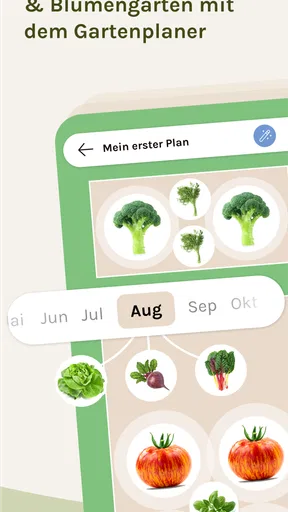
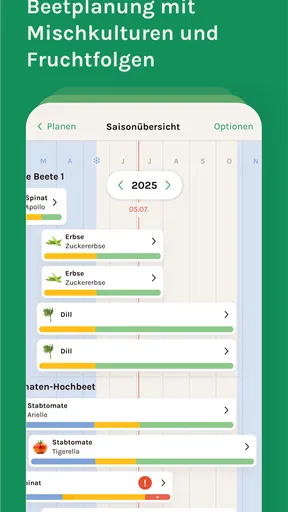
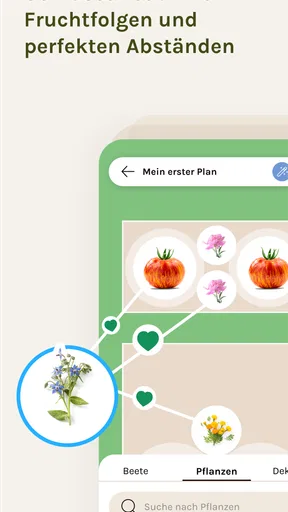
Once you're in, the app really starts to show off its features. You can plan everything from vegetable patches to flower beds with ease. The drag-and-drop interface lets you move plants around your virtual garden plot, which is much easier than digging up your yard just because you changed your mind. It's almost like playing a game, but with real-life rewards.
In practice, I would treat the layout as a working sketch rather than a final blueprint. Start by placing the things that are hard to move, such as existing beds or a permanent path, then arrange plants around them. If a layout looks cramped, moving a plant on screen is a low-cost way to test alternatives. I also like to keep the first draft simple: a few crops I know I want, plus space for experiments. That makes the design easier to use when the season gets busy.
The planner is most valuable when it turns “I want to grow a bit of everything” into choices about space. If I have a small plot, I can see that adding another crop means giving up room elsewhere. If I have a larger garden, the same visual overview can help separate the areas I tend to often from those I can leave alone for longer. This is a more useful question than whether a design looks attractive on a screen: will I be able to reach, tend, and harvest what I have put there?
A small but practical habit is to save a version before making a large change. Multiple designs make it easier to compare a conservative layout with a more ambitious one without losing the original. I would name or otherwise distinguish plans by purpose in my own workflow, such as a lower-effort option and a trial layout, so I can return to the sensible plan if the more adventurous one becomes unrealistic.
The plant information can help narrow down choices, but I would still use local conditions as the final check. A general note about sunlight or growth habits is a starting point, not a guarantee that a plant will thrive in every yard. Observe where the sun falls through the day, consider what your soil and weather are like, and be cautious about treating companion suggestions as a substitute for learning how plants behave in your own space. The app supports planning; it cannot make those site-specific decisions for you.
That distinction is important for beginners. A database can make unfamiliar crops feel less intimidating, especially when it explains basic growing needs, but it does not remove the need to learn by doing. I would use it to choose a manageable first group of vegetables rather than fill every available space with plants I have never grown. A modest plan is easier to maintain and gives you a better chance to learn which advice suits your garden.
Customization and Personal Touch
The customization options are quite flexible. If you're feeling creative, you can even add pathways, fences, and garden furniture to your design. I spent a good chunk of time just playing around with different layouts and designs, dreaming up the perfect backyard oasis. The app also allows you to save multiple designs, so you can experiment without losing your original plans.
Decorative details are enjoyable, but I get the most value from using them to think through how I will move around the garden. A path is not just a visual flourish if it lets me reach the middle of a bed without stepping on soil. Likewise, placing furniture in a sketch can remind me that a seating area competes with growing space. I would add these elements after the productive areas are roughly settled, so the design stays grounded in what the garden needs to do.
Here is a realistic way I would use it: on a weekend, I measure the beds and sketch what is already planted, then try a couple of arrangements for the vegetables I want to add. Later, before buying seeds, I check the plan again and remove anything that would make the beds too crowded or awkward to reach. When planting time arrives, I can refer back to the layout instead of trying to reconstruct a half-remembered idea. The app is most helpful when it connects those separate decisions, not when it becomes another project to perfect.
Compared with a paper notebook, a digital layout is easier to rearrange and compare without erasing or redrawing the whole garden. A simple notes app can hold a seed list or reminders, but it does not give the same spatial overview. On the other hand, paper may be faster for someone who wants to jot down a rough plan outdoors, and a dedicated spreadsheet may suit gardeners who prefer to track details in rows and columns. I would choose this planner when seeing the arrangement is central to the problem; I would not expect it to replace every gardening note or local reference.
Saving alternatives also helps with uncertainty. If I am torn between giving more room to a familiar crop or trying something new, I can preserve both arrangements and decide later. That is a useful way to avoid an all-or-nothing choice, particularly when I am still learning how much time I can give the garden. The trade-off is that several designs can become confusing if they are not kept distinct, so I would avoid making a new version for every tiny adjustment.
Room for Growth
While the app is packed with useful features, there are a couple of areas where it could grow. For instance, some users might find the plant database a bit limited, depending on their specific interests. However, the developers seem open to feedback and updates, so I'm hopeful this will improve over time.
That limitation matters most if your garden is built around unusual varieties or you want highly specific growing guidance. In that case, I would use the planner for the layout and keep a trusted gardening book, local advice, or my own notes alongside it. A missing plant entry does not make the spatial plan useless, but it can interrupt the convenience of keeping everything in one place. Gardeners who expect an exhaustive reference should check whether the plants they care about are represented before relying on it as their only source.
There is also a difference between a reminder and a complete care schedule. The ability to set planting and watering reminders can help me remember intentions, but the timing still needs to fit the crop, weather, and condition of the soil. I would not water simply because a notification appears if the ground is already wet, nor assume that a reminder covers every task a plant needs. Used as a prompt to inspect the garden, rather than an automatic instruction, it is more likely to help than mislead.
The app is free to start, while in-app purchases range from $11.99 to $199.99 per item. That is a broad range, so I would look carefully at the particular purchase and its value to my own planning before spending. Someone who only needs a basic layout may be content to begin without paying; a regular user may decide that an available paid option is worthwhile, but should make that decision after seeing how the free experience fits their needs. I would not buy anything just because I am excited about a new garden plan.
Another possible friction is that planning can become its own distraction. It is easy to spend time rearranging beds and adding details instead of checking the ground, choosing seeds, or getting started. If you already know the rough arrangement you want, a quick sketch on paper may be enough. I would reach for this app when I have several planting decisions to balance, not for every small change in the garden.
And while the interface felt approachable to me, people who have never planned a garden may still need time to decide what to put where. The tool can make an arrangement visible, but it cannot choose a realistic workload for you. Begin with fewer crops than you think you can manage, leave some breathing room, and expand after you understand your routine. That advice is especially useful for anyone who tends to overcommit when planning from the comfort of a phone.
Who Gets the Most from It
Overall, Garden Planner by Fryd offers a fantastic blend of functionality and ease of use, making it a must-have for anyone looking to design their own green paradise. Whether you're a seasoned gardener or just starting out, this app provides the tools and inspiration to bring your garden ideas to life.
I would recommend it most to someone who has a real growing space to organize and enjoys thinking visually: a first-time vegetable gardener with a few beds, a household trying to make better use of a sunny corner, or an experienced grower testing a different arrangement. It can be especially useful when several people share garden decisions, because a visible plan gives everyone something concrete to discuss before plants go into the ground. For someone who grows only a pot or two and already knows where they belong, the setup may be more effort than the problem deserves.
It is also not the best fit for a gardener who wants the app to make every decision automatically. I see it as a planner, not a substitute for observation or experience. If precise local cultivation advice is your priority, pair it with a source that reflects your region; if you mainly want a checklist, a basic notes tool may be quicker. The advantage here is the combination of a visual arrangement, plant information, saved designs, and reminders, rather than any one of those elements acting as a complete gardening system by itself.
For people wondering whether they need gardening experience first, I would say no, but a little patience helps. You can start with a straightforward layout and use the plant details to guide early choices. For someone who already has a garden, the best starting point is to record what is there before redesigning it; otherwise, it is easy to make an attractive plan that ignores existing plants or practical constraints. Either way, the plan should stay flexible as you learn what actually works.
Final Thoughts
So, if you're ready to roll up your sleeves and get your hands dirty, why not give it a try? It's like having a seasoned gardener by your side, guiding you every step of the way. Who knows, you might just have the garden of your dreams ready to bloom by next season.
My honest recommendation is to try it if organizing a vegetable garden is the part that currently holds you back. The visual layout can turn vague intentions into a plan you can revise, and the ability to keep alternatives makes it easier to choose without committing too early. Just keep the design tied to real measurements, use reminders as prompts rather than rules, and check local growing conditions before treating plant guidance as definitive. With those expectations, it feels like a practical companion for planning, while the actual success of the garden still comes from adapting the plan to the space and caring for it as the season unfolds.
Verdict
Strengths of Garden Planner by Fryd
- User-friendly interface for easy navigation.
- Extensive plant database for detailed info.
- Customizable garden layouts with drag-and-drop.
- Offline mode available for planning anytime.
- Regular updates with new features and plants.
Limitations of Garden Planner by Fryd
- Limited free features; premium needed for full access.
- Occasional bugs can disrupt planning experience.
- Requires internet for some advanced features.
- No real-time weather integration for optimal planning.
- Lacks community sharing for gardening ideas.
Similar Picks in This Category
View All
Universal TV Remote Control
CodeMatics Media Solutions3.9

AlfredCamera Home Security app
Alfred Systems Inc.4.7

Planner 5D: AI Home Design
Planner 5D4.5

Universal Tv Remote-Cast to TV
One Music Player4.1

Zillow: Homes for Sale & Rent
Zillow Group4.8

99acres Buy/Rent/Sell Property
infoedge.com4.3
Frequently Asked Questions
What is Garden Planner by Fryd, and how does it work?
Garden Planner by Fryd is a user-friendly app designed to help garden enthusiasts plan and organize their gardens. The app allows users to design their garden layout, choose plants, and track growth. It features a drag-and-drop interface, making it easy to visualize your garden and experiment with different designs.
Is Garden Planner by Fryd suitable for beginners?
Yes, Garden Planner by Fryd is perfect for beginners thanks to its intuitive interface and helpful tutorials. It offers a step-by-step guide to designing your garden and selecting plants, ensuring that even those new to gardening can create a thriving space with ease.
What platforms is Garden Planner by Fryd available on?
Garden Planner by Fryd is available for both Android and iOS devices. This ensures that users can plan their gardens on the go, using either their smartphone or tablet. Check the app store on your respective device for availability and download options.
Does Garden Planner by Fryd offer plant care tips?
Yes, the app provides detailed plant care tips and advice to help users maintain a healthy garden. It includes information on watering schedules, sunlight requirements, and soil preferences, allowing gardeners to make informed decisions about their plant care routines.
Are there any in-app purchases in Garden Planner by Fryd?
While Garden Planner by Fryd offers a free version with basic features, it also provides in-app purchases for additional tools and plant varieties. These optional purchases enhance the user experience by offering more customization options and advanced planning capabilities.
